'%20fill='%23fff'%3e%3cpath%20d='M24%20364.337V24h141.909c25.481%200%2046.833%203.601%2064.056%2010.803%2017.222%207.191%2030.183%2017.279%2038.882%2030.24s13.049%2027.972%2013.049%2045.041c0%2012.961-2.72%2024.513-8.148%2034.645-5.429%2010.142-12.906%2018.534-22.431%2025.174-9.526%206.651-20.548%2011.299-33.069%2013.953v3.325c13.732.661%2026.451%204.383%2038.134%2011.134%2011.684%206.762%2021.077%2016.155%2028.168%2028.17%207.092%2012.025%2010.638%2026.231%2010.638%2042.628%200%2018.281-4.647%2034.601-13.952%2048.939-9.305%2014.35-22.762%2025.648-40.381%2033.908-17.607%208.248-38.992%2012.377-64.143%2012.377H24zm82.258-200.414h45.534c8.975%200%2016.947-1.497%2023.929-4.493s12.432-7.312%2016.374-12.961c3.931-5.65%205.902-12.466%205.902-20.439%200-11.409-4.041-20.384-12.135-26.926-8.082-6.53-18.995-9.801-32.738-9.801h-46.866v74.62zm0%20134.109h50.853c17.839%200%2030.987-3.381%2039.466-10.131%208.479-6.762%2012.708-16.178%2012.708-28.247%200-8.755-2.049-16.309-6.145-22.686-4.096-6.365-9.922-11.298-17.443-14.789-7.532-3.491-16.561-5.231-27.089-5.231h-52.339v81.095l-.011-.011zM388.865%2024v340.337h-81.256V24h81.256zm181.618%20230.159V109.082h81.091v255.255h-77.435v-47.529h-2.665c-5.649%2015.616-15.263%2028.004-28.829%2037.145-13.578%209.14-29.941%2013.71-49.102%2013.71-17.398%200-32.683-3.986-45.864-11.97-13.181-7.973-23.433-19.14-30.745-33.489s-11.023-31.165-11.133-50.437V109.082h81.256v146.739c.11%2013.854%203.766%2024.767%2010.968%2032.74s17.002%2011.96%2029.413%2011.96c8.082%200%2015.372-1.795%2021.847-5.407%206.486-3.601%2011.628-8.865%2015.45-15.781%203.821-6.927%205.737-15.318%205.737-25.174h.011zm224.376%20115.002c-26.704%200-49.718-5.286-69.044-15.869-19.337-10.583-34.181-25.703-44.532-45.371-10.362-19.668-15.537-43.069-15.537-70.215s5.208-49.445%2015.614-69.212c10.418-19.779%2025.096-35.174%2044.037-46.197s41.261-16.53%2066.962-16.53c18.17%200%2034.787%202.83%2049.851%208.48s28.08%2014.007%2039.048%2025.086%2019.501%2024.734%2025.591%2040.966%209.14%2034.81%209.14%2055.756v20.273H694.145v-47.199h146.226c-.11-8.633-2.159-16.342-6.145-23.104s-9.448-12.047-16.374-15.869-14.866-5.726-23.841-5.726-17.233%202.015-24.424%206.057c-7.202%204.052-12.906%209.537-17.112%2016.452-4.207%206.927-6.431%2014.757-6.652%2023.512v48.025c0%2010.417%202.049%2019.525%206.145%2027.332s9.911%2013.876%2017.454%2018.193c7.532%204.317%2016.506%206.486%2026.924%206.486%207.201%200%2013.731-1.002%2019.612-2.995%205.869-1.993%2010.912-4.923%2015.119-8.81%204.206-3.876%207.367-8.645%209.47-14.294l74.616%202.158c-3.105%2016.728-9.889%2031.264-20.361%2043.62s-24.182%2021.937-41.129%2028.743c-16.947%206.816-36.559%2010.219-58.825%2010.219l.011.033z'/%3e%3c/g%3e%3cdefs%3e%3cclipPath%20id='A'%3e%3cpath%20fill='%23fff'%20transform='translate(24%2024)'%20d='M0%200h892v345.161H0z'/%3e%3c/clipPath%3e%3c/defs%3e%3c/svg%3e)
Safety and Approvals
Understand AI Agent permissions and approve bulk, destructive, non-reversible, or uncertain actions before they run.
The AI Agent uses your existing Blue permissions. It also asks for approval before applicable bulk, destructive, non-reversible, or uncertain actions.
Blue Applies Your Permissions
Blue authorizes AI Agent tools as the person who requested the work. If you cannot view or change an item, the AI Agent cannot bypass that restriction.
This rule applies to:
- The AI Agent panel.
@Bluerequests in record comments.- Actions that run after approval.
Comments written by the assistant appear under the configured agent name. The requesting person’s permissions still control the action.
Panel Autonomy Modes
Select an autonomy mode in the composer before you send a message:
- Plan: The assistant can investigate and recommend steps. It does not change Blue data.
- Ask: Every write waits for approval in an action card.
- Auto: A reversible, single-item write can run after safety classification. Bulk, destructive, non-reversible, and uncertain writes wait for approval.
For the complete panel workflow, see Using the Assistant.
Approvals in Record Comments
When you mention @Blue in a record comment, supported reversible changes to one item can run immediately. Examples include creating a record or updating one record.
The following requests require a confirmation reply:
- Bulk record updates.
- Bulk custom field changes.
- Destructive actions, including moving records to Trash.
- Non-reversible writes, such as creating lists or changing checklists.
The comment assistant does not perform view-control actions or cross-workspace record moves.
For example, if you ask Blue to move five records to trash, Blue replies with a summary like:
I can move 5 records to trash.
Reply @Blue approve to run it, or @Blue cancel to skip.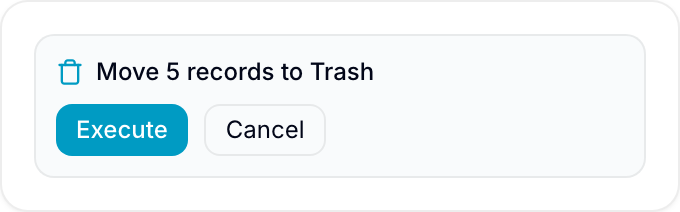
Reply in the same thread with @Blue approve to run the pending action. Reply with @Blue cancel to reject it.
Natural replies such as @Blue yes, go ahead also work when they clearly approve the exact pending request.
Ambiguous Replies Do Not Run Actions
If a reply changes the scope, adds a condition, or is unclear, Blue does not run the pending action. It asks for explicit approval or cancellation.
These replies do not approve an action:
@Blue only the urgent ones@Blue wait, which records?@Blue maybe later
An approval must clearly refer to the pending request.
Who Can Approve a Comment Action
The person who requested the action can approve it. Organization owners and administrators can also approve it.
If another member replies, Blue does not run the action. Blue explains who can approve it.
Record Deletion Uses Trash
When the AI Agent deletes a record, Blue moves it to Trash. The AI Agent action does not permanently erase the record.
Moving a record to Trash is still destructive because it changes visibility and workflows. Blue requires approval in the panel and record comments.
Multiple Pending Requests
If one request creates several pending actions, Blue treats them as one approval group. One approval runs the complete group.
If a comment thread has pending requests from separate turns, Blue does not select one. Use the AI Agent panel or submit a narrower request.